GMOD
Tripal Developer’s Handbook
Contents
- 1 Introduction
- 2 Using the Drupal Devel Module
- 3 Theming
API
- 3.1 Skills Required
- 3.2 Best Practices
- 3.3 Brief Introduction to Drupal Theming
- 3.4 Introduction to the Tripal Theme
- 3.5 Structure of the Tripal Theme Directory
- 3.6 Themeing Content Types
- 3.7 Where To Put a Template File
- 3.8 Layout of a Tripal Node Template
- 3.9 Dissecting a Tripal Node Template File
- 4 Module Development API
Introduction
Tripal provides two Application Programming Interfaces (APIs) that allows developers to interact and customize Tripal and Chado content:
- Tripal Themeing API: allows customization of the look-and feel of the site through API function calls and template files.
- Tripal Module Development API: allows addition of new or custom functionality through module development.
The Themeing API provides an interface for developers who want to change the look-and feel of their site. These developers may not necessarily want to create new modules, but want to customize how their data is presented. The first section in this handbook describes how to use the API to make such changes. A knowledge of Chado and the relationships between tables is necessary to use the Themeing API.
The Module Development API provides an interface for module developers to interact with the Chado database as well as the other Tripal core functions such as jobs management, materialized views, in-house vocabularies. An understanding of the Drupal API and Drupal module development is required.
If you find details in this document lacking, please subscribe to the Tripal mailing list and let us know!
Using the Drupal Devel Module
Before staring your development work, it is suggested that you download and install the Drupal devel module. This module helps greatly with debugging your custom theme or module. A very useful function of this module is the dpm function. You can use the dpm function to print to the web page an interactive view of the contents of any variable. This can be extremely helpful when accessing Chado data in objects and arrays returned by Tripal.
For example, each template for a node has a node object. If you want to see all of the variables and record present in the node object simply add the following to the top of the template file:
dpm($variables['node']);
To see a list of all of the variables avaialable to your template you would use the following:
dpm($variables);
This function can also be used for debugging variables during module development.
Theming API
Skills Required
In order to use the Tripal Theming API to customize templates the developer should have the following skills:
- Knowledge of PHP
- Knowledge of Chado and relationships between tables (at least tables where data of interest is stored).
- Understanding of the Tripal theming API
- Understanding of how Drupal theming works
Best Practices
There are a few rules to follow when updating templates
- All development should follow standard Drupal coding standards: http://drupal.org/coding-standards.
- Do not use SQL statements inside of the template files. While you can do this it makes your templates longer and harder to read. Instead always try to use the Tripal API function calls as described below.
- Always copy the template files from the Tripal theme to your own default theme before editing. Try to preserve the directory structure when copying. This will ensure that future updates to Tripal will not overwrite your customizations. Drupal will prefer to use the templates in your default them rather than those with the same name in the Tripal theme.
Brief Introduction to Drupal Theming
Drupal is designed to allow for relatively easy changes to the look-and-feel of the website. PHP code dedicated to the user presentation is intended to be housed in special template files for site developers to customize. The Drupal package comes with several themes as part of the default offering, however thousands of user-contributed themes are available for site-developers to download, install, and almost instantly change the look and feel of their sites. A Drupal Theme repository is available for searching user-contributed themes.
Each theme is physically a directory within the Drupal site that contains a set of PHP template files, JavaScript and CSS files. Some of the files in the theme directory are required and some are named according to Drupal naming styles so that Drupal can properly find them. For an in-depth overview of theming within Drupal, please see the Drupal Theming Guide.
Introduction to the Tripal Theme
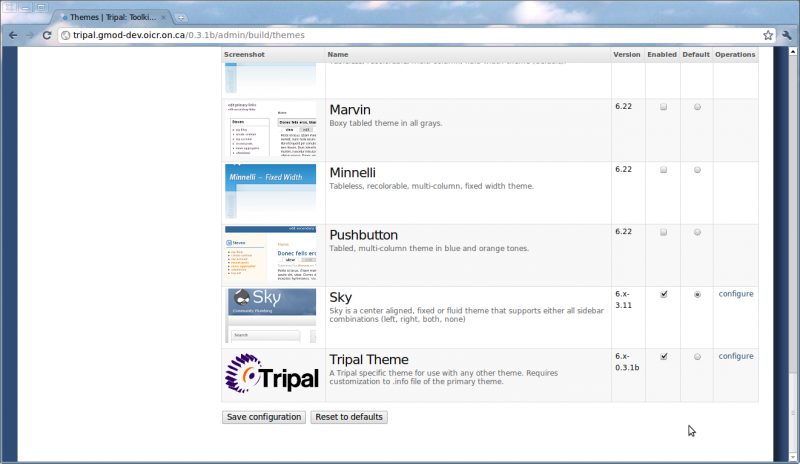
Tripal v0.6x-0.3.1b and later versions comes with a base theme. A base theme is one which is not intended to be used as the default theme for the site, but rather provides a set of supportive templates for the default theme. The screen shot below shows the Drupal theme administration page (Administer → Site Building → Themes) of a demo Tripal installation. As shown in the screen shot below, the Tripal theme is enabled, but is not default. In the example screen shot, the Sky theme is default. Thus the primary look-and-feel of the site is controlled by the Sky theme, and the Tripal theme only provides a look-and-feel for Chado-based content:
Structure of the Tripal Theme Directory
In a typical Drupal installation, the Tripal theme is installed in the directory:
/[drupal dir]/sites/all/themes/theme_tripal
Where [drupal dir] is the location where Drupal is installed.
Inside of the Tripal theme are the following files:
- tripal.info: a file required by Drupal to identify the theme and specify location of theming components
- logo.png: a file of the Tripal logo seen when viewing the Drupal Theme administrative page
- node.tpl.php: a default template file when no other template is available. In practice this file is currently not used as each content type created by Tripal has a template file.
- node-[content type].tpl.php: a series of PHP template files use to theme specific Chado content, where [content type] is the name of a content type such as ‘feature’, ‘library’, etc. These names correspond to the same content types available when creating new content in Drupal.
Inside of the Tripal theme are the following directories:
- tripal_[content type]: a series of directories with sub templates for each Chado content type.
- js: a directory that houses all of the javascript files for the theme. Each Tripal module has its own Javascript file.
- css: a directory that houses all of the CSS files for the theme. Each Tripal module has its own CSS file.
- images: a directory for storing images referenced by any of the template files.
Themeing Content Types
Each content type in Drupal has two names, a human-readable name and a programmatic name. When Drupal shows a content type (or node) for display it attempts to find an appropriate theming template file by using the programmatic name of the node. Drupal will look for a file with the following name:
node-[content type].tpl.php
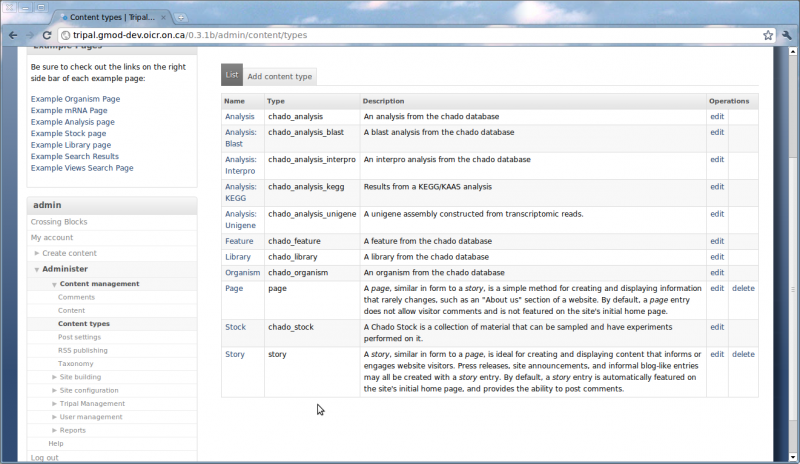
where [content type] is the programmatic name of the node type. You can find the names of all content types in Drupal by navigating to the administer content page: Administer → Content Management → Content Types (screen shot below). A listing of all available content types is provided and the programmatic name is given in the ‘type’ column of the table. For example, the node-chado_feature.tpl.php file is the template file for the chado_feature content type.
For the core Tripal package, the following content type names are available:
- chado_analysis
- chado_feature
- chado_library
- chado_organism
- chado_stock
Additionally, several commonly used extension modules have the following content type names:
- chado_analyis_blast (Blast Analysis Extension)
- chado_analysis_interpro (Interpro Analysis Extension)
- chado_analysis_kegg (KEGG Analysis Extesion)
- chado_analysis_unigene (Unigene Analysis Extension)
For any Tripal content type, either from the base Tripal package or a Tripal extension a template file should be available for customization.
Where To Put a Template File
By default, Drupal will search for a node’s template file by first looking in the module directories. In general, Tripal avoids housing any theme template files in modules because when module are updated any customization to theme templates will be overwritten. Next, Drupal searches the enabled Tripal base theme directory and if it finds an appropriate template will use it. However, if a template of the same name exists in the current default theme that template file takes precedence.
| | |
|—-|—-|
|  | Best Practice Tip. It is best to always copy any templates files out of the Tripal theme directory into your default theme for editing. This way, future upgrades to Tripal, that may change the template files will not affect customizations to your site. |
Layout of a Tripal Node Template
Each content type provided by Tripal follows the same layout pattern. Below is a screen shot of an organism page (chado_organism content type) from the Citrus Genome Database.
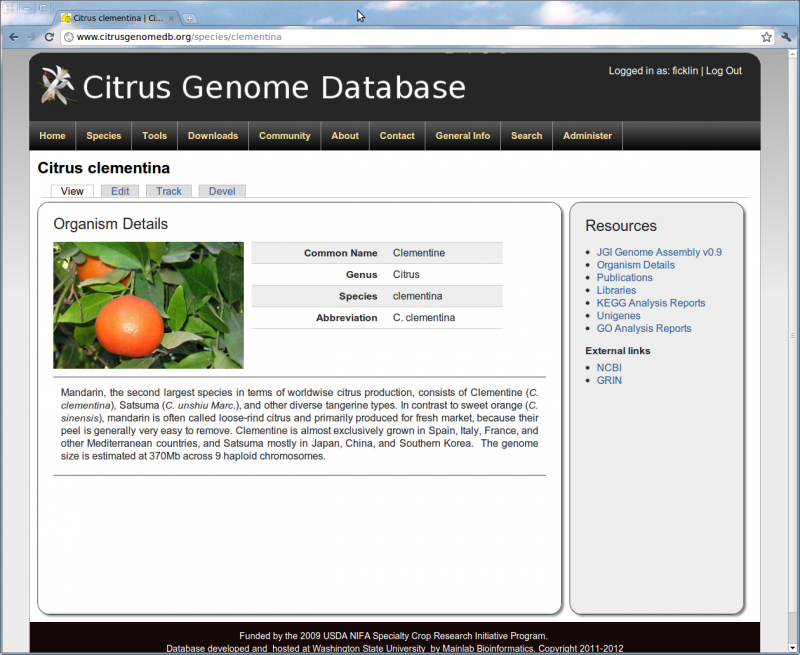
In the screen shot above, there are two distinct regions added by the Tripal templates. The first is the large content section on the left-hand side of the screen. This section provides a display of the data. The second region is the right sidebar that lists additional Resources for this content type. This layout structure is created in the node-[content_type].tpl.php template file for each node (for this example, the node-chado_organism.tpl.php template). A more in depth description of the code in this template file will be provided next. All of the node template files follow this same structure
| | |
|—-|—-|
| | Best Practices: If you would like to maintain this layout structure for any themes of new content types for new Tripal extensions, you will want to follow this same structure in your template files. See the next section for more details. |
Dissecting a Tripal Node Template File
Template Basics
All of the Tripal node templates are identical in structure, although each one is suited for the content it serves. Therefore, to demonstrate the layout of the Tripal node templates, this guide will use the chado_feature content type template as the example. In order to understand where and how to edit the node template files, the various sections of the chado_feature template will be shown and explained. The following descriptions assume some familiarity with the PHP language.
Each content type in Tripal corresponds roughly to a table module in Chado. For a listing of Chado modules, see this page: http://gmod.org/wiki/Chado_-_Getting_Started#Modules. It is normally easy to identify which Tripal module, and hence which content type corresponds to each Chado module as the naming is consistent (i.e. Tripal stock module and ‘chado_stock’ content type correspond to the Chado stock module). One exception is the Tripal feature module and the ‘chado_feature’ content type, which was inadvertently named ‘chado_feature’ rather than ‘chado_sequence’.
Tripal exports automatically the data needed for each content type template. Drupal makes a $variables associative array available to all templates, and Tripal adds data to this variable. Thus, in the ‘chado_feature’ template, the following line appears near the top of the template:
$feature = $variables['node']->feature;
Tripal queries the feature table of Chado, as well as those linked by foreign key constraints, and adds the results to the $variables[‘node’]->feature array. In the example code above, this is simplified to a variable named $feature.
Layout Sections
As mentioned previously, the node template files have two major regions:
- a details section
- a resources sidebar.
In the template file, each of these sections is defined by div tags with special CSS class names. First is the details section:
   <!-- Basic Details Theme -->
   <?php print theme('tripal_feature_base',$node); ?>

   <!-- Database References -->
   <?php print theme('tripal_feature_references', $node); ?>

   <!-- Properties -->
   <?php print theme('tripal_feature_properties', $node); ?>

   <!-- Annotated Terms -->
   <?php print theme('tripal_feature_terms', $node); ?>

   <!-- Synonyms -->
   <?php print theme('tripal_feature_synonyms', $node); ?>

   <!-- Phenotypes -->
   <?php print theme('tripal_feature_phenotypes', $node); ?>

   <!-- Maps -->
   <?php print theme('tripal_feature_featurepos', $node); ?>

   <!-- Sequence --> <?php
   if(strcmp($feature->type_id->name,'scaffold')!=0 and
      strcmp($feature->type_id->name,'chromosome')!=0 and
      strcmp($feature->type_id->name,'supercontig')!=0 and
      strcmp($feature->type_id->name,'pseudomolecule')!=0)
   {
      print theme('tripal_feature_sequence', $node);
   } ?>

   <!-- Formatted Sequences -->
   <?php print theme('tripal_feature_featureloc_sequences', $node); ?>

   <!-- Relationships -->
   <?php print theme('tripal_feature_relationships', $node); ?>

   <!-- Feature locations --> <?php
   if(strcmp($feature->type_id->name,'scaffold')!=0 and
      strcmp($feature->type_id->name,'chromosome')!=0 and
      strcmp($feature->type_id->name,'supercontig')!=0 and
      strcmp($feature->type_id->name,'pseudomolecule')!=0)
   {
      print theme('tripal_feature_alignments', $node);
   } ?>


   <!-- Resource Blocks CCK elements --><?php
   for($i = 0; $i < count($node->field_resource_titles); $i++){
     if($node->field_resource_titles[$i]['value']){ ?>
       -box" class="tripal_feature-info-box tripal-info-box">
         <?php print $node->field_resource_titles[$i]['value'] ?>
         <?php print $node->field_resource_blocks[$i]['value']; ?>
       <?php
     }
   }?>

   <!-- Let modules add more content -->
   <?php print $content ?>
In the example code above, taken from the node-chado_feature.tpl.php file, a div block is created with a unique id name of tripal_feature_details and the CSS class name is tripal_details. It is the assignment of the CSS class tripal_details that gives this details box the styling seen on all Tripal node pages.
Also, within this div block are several print theme statements one of which is as follows:
<?php print theme('tripal_feature_base',$node); ?>
These statements instruct Drupal to load subtemplates. These subtemplates are used to house the code for subcontent and are intended to keep the primary node template concise and from becoming excessively long. More on these subtemplates is described in a later section.
By default, some conditional logic is present in the template for filtering large datasets. For example, the following if statement only includes the tripal_feature_sequence.tpl.php subtemplate if the feature type is not a scaffold, chromoosme, supercontig or pseudomolecule. This is because those datasets typically have very large sequences that would be too slow for the page.
   <!-- Sequence -->
   <?php
   if(strcmp($feature->type_id->name,'scaffold')!=0 and
      strcmp($feature->type_id->name,'chromosome')!=0 and
      strcmp($feature->type_id->name,'supercontig')!=0 and
      strcmp($feature->type_id->name,'pseudomolecule')!=0)
   {
      include('tripal_feature/tripal_feature_sequence.tpl.php');
   }
   ?>
Finally, the resources side-bar is the last thing defined in the default node templates. The code is as follows:
   Resources
   <ul id="tripal_feature_toc_list" class="tripal_toc_list">

     <!-- Resource Links CCK elements --><?php
     for($i = 0; $i < count($node->field_resource_links); $i++){
       if($node->field_resource_links[$i]['value']){
         $matches = preg_split("/\|/",$node->field_resource_links[$i]['value']);?>
         <li><a href="<?php print $matches[1] ?>" target="_blank"><?php print $matches[0] ?></a></li><?php
       }
     }?>

     <?php // ADD CUSTOMIZED <li> LINKS HERE ?>
   </ul>
Here, the div block is given a unique name of tripal_feature_toc and the class defined is tripal_toc. This tripal_toc class is responsible for theming the resources sidebar to look the way it does. Additionally, the title of the side bar is provided in the div block with the class tripal_toc_title and an empty HTML list block, ul tag, with the class tripal_toc_list. This empty list is where the list of resources will appear.
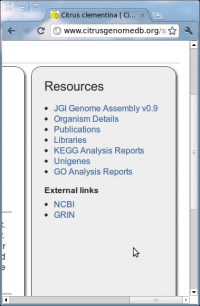
You can add custom link to the resources side-bar by simply adding elements in the tripal_toc_list block. For example, the following screen shot shows the resources sidebar on an organism page of the Citrus Genome Database. The JGI Genome Assembly v0.9 link shown in the screen shot is a custom link manually added to the template file, as well as the External Links section towards the bottom. The code to add these links is as follows:
 |
|
Notice in the example code the link for the genome assembly appears in the ul block with the class tripal_toc_list. This ensures that the custom links will appear in the list where other Chado content is added. But notice that the External links appear as a separate ul block. Only dynamic content is added to the tripal_toc_list ul block, so the external links list appears below.
Summary
In Summary, each node template file has two major sections:
- a div block defined with a class of tripal_details to serve
as the container for content
- this section contains include statements for subtemplates and logic to include subtemplates under different conditions.
- a div block defined with a class of tripal_toc to serve as
the resources side bar
- a title for the resources sidebar defined by a block with a class of tripal_toc_title
- a list section for the resources sidebar defined by a block with a class of tripal_tocl_list
| | |
|—-|—-|
| | Best Practices: A Tripal compatible template file should only have one div block for the details region and one block the resources side bar. |
Subtemplates
Description of a Subtemplate
In the template layout section described previously it was shown how subtemplates are incorporated into the principle template file. These subtemplates are included using PHP print theme statements within the details div block. For the feature content type of Tripal v1.1 the following subtemplates are available:
- tripal_feature_alignments.tpl.php
- tripal_feature_analyses.tpl.php
- tripal_feature_base.tpl.php
- tripal_feature_featureloc_sequences.tpl.php
- tripal_feature_featurepos.tpl.php
- tripal_feature_genotypes.tpl.php
- tripal_feature_libraries.tpl.php
- tripal_feature_nd_genotypes.tpl.php
- tripal_feature_phenotypes.tpl.php
- tripal_feature_properties.tpl.php
- tripal_feature_references.tpl.php
- tripal_feature_relationships.tpl.php
- tripal_feature_sequence.tpl.php
- tripal_feature_synonyms.tpl.php
- tripal_feature_teaser.tpl.php
- tripal_feature_terms.tpl.php
Each of these subtemplates adds to the details section of the page a specific category of data. For example, the tripal_feature_synonyms.tpl.php template will add a listing of synonyms for the feature. And the tripal_feature_references.tpl.php template will add a listing of external reference for the feature. Both of these data are extracted directly from tables in Chado through foreign key relationships. By default, the first subtemplate included in the details section is displayed when the page is first loaded. Content from the other subtemplates are then visible by clicking the links in the resources side bar. These links are added automatically for all subtemplates to the sidebar using Javascript described in the next section.
| | |
|—-|—-|
| | Best Practices: By convention, the default subtemplate (the one listed first) should have the word base in the template name. This is to easily identify it as a type of “home page” for the content type. |
All subtemplates for a content type should be stored in a directory with a similar name as that of the content type. For the chado_feature content type, a ‘tripal_feature’ directory exists. Any subtemplate intended to incorporate data into the chado_feature template should be housed in this directory. The same is true for all content types.
Each subtemplate file follows the same structural layout:
- A top section where variables are defined
- A div block of class tripal-info-box to define the container for the content. All data should be displayed within this block.
- Two internal div boxes:
- One to identify the title of the container with a class of tripal-info-box-title
- One to provide a description of the content of class of tripal-info-box-desc
The following code is taken from the tripal_feature_base.tpl.php template and demonstrates the use of each of the required structural elements descrbibed above:
  <?php print $feature->type_id->name ?> Details

  [.... additional content here ....]
Adding a New Subtemplate
To add a new subtemplate to Tripal follow these steps
-
Create the template file with a .tpl.php extension in the appropriate subtemplate directory. For example, to add a new subtemplate with content to appear on a feature page, add the file to the tripal_theme/tripal_feature directory.
-
Follow the guidelines for the structural layout of the PHP code as described in the previous section. To access data from Chado, in the templates, follow the instructions in the Accessing Chado Data section below.
-
Add an entry in the appropriate node template file for this new template. For example, to add a new subtemplate to appear on the feature page, add a new entry to the node-chado_feature.tpl.php file. The entry should be an include statement such as:
<?php include('tripal_feature/tripal_feature_mysubtemplate.tpl.php'); ?>
You may have noticed that here we use an include statement for the subtemplate file rather than use a print theme statement as with other subtemplates. This is because we are adding a single template which is managed by a Tripal module.
| | |
|—-|—-|
| | Best Practices: You should not need to add SQL queries to the PHP subtemplates. Use the Tripal API to access all necessary data. |
Template JavaScript
Not all of the subtemplates appear in the content section at one time. Only content from one subtemplate will be shown at a time. The Resources sidebar on the right is used for interactive cycling through the content contributed by each subtemplate. This behavior is controlled by JQuery and CSS classes. Below is the JavaScript code take from the node-chado_feature.tpl.php template file:
<script type="text/javascript">
if (Drupal.jsEnabled) {
   Drupal.behaviors.organismBehavior = function (context){
      // hide all tripal info boxes at the start
      $(".tripal-info-box").hide();

      // iterate through all of the info boxes and add their titles
      // to the table of contents
      $(".tripal-info-box-title").each(function(){
        var parent = $(this).parent();
        var id = $(parent).attr('id');
        var title = $(this).text();
        $('#tripal_feature_toc_list').append('<li><a href="#'+id+'" class="tripal_feature_toc_item">'+title+'</a></li>');
      });

      // when a title in the table of contents is clicked, then
      // show the corresponding item in the details box
      $(".tripal_feature_toc_item").click(function(){
         $(".tripal-info-box").hide();
         href = $(this).attr('href');
         $(href).fadeIn('slow');
         // we want to make sure our table of contents and the details
         // box stay the same height
         $("#tripal_feature_toc").height($(href).parent().height());
         return false;
      });

      // we want the base details to show up when the page is first shown
      // unless the user specified a specific block
      var block = window.location.href.match(/[\?|\&]block=(.+?)\&/)
      if(block == null){
         block = window.location.href.match(/[\?|\&]block=(.+)/)
      }
      if(block != null){
         $("#tripal_feature-"+block[1]+"-box").show();
      } else {
         $("#tripal_feature-base-box").show();
      }

      $("#tripal_feature_toc").height($("#tripal_feature-base-box").parent().height());
   };
}
</script>
When the page first loads, the Javascript hides all of the sub template content with the following statement:
$(".tripal-info-box").hide();
It then iterates through each subtemplate and adds the title to the Resources side-bar, adds a javascript function to each link to make it visible when clicked, sets the first subtemplate as visible and adjusts the height of the Resources side-bar.
| | |
|—-|—-|
| | Best Practices: When creating a template for a new node, the Javascript code above should be duplicated, with names of the content and sidebar div blocks changed to match your content name. |
Accessing Chado Data
As mentioned previously, Tripal automatically exports the data needed for each content type template. The $variables variable is an associative array available in all templates. By default Tripal will populate this variable with the record from the appropriate Chado table. For example, for the chado_feature content type, Tripal will automatically query the Chado feature table and add the record to the variable. The record is then available in the template in the following way:
$feature = $variables['node']->feature;
In the example code above, the $feature variable now contains the record from the feature table. The fields for the record can then be accessed in the following way:
   $name = $feature->name;
   $uniquename = $feature->uniquename;
   $feature_id = $feature->feature_id;
   ...
The following example code, taken from the tripal_feature_base.tpl.php subtemplate file shows how these fields are accessed and used:
<?php

$feature  = $variables['node']->feature;

?>

  <?php print $feature->type_id->name ?> Details


   <?php if(strcmp($feature->is_obsolete,'t')==0){ ?>
      This feature is obsolete
   <?php }?>
   <table id="tripal_feature-base-table" class="tripal_feature-table tripal-table tripal-table-vert">
      <tr class="tripal_feature-table-even-row tripal-table-even-row">
        <th>Name</th>
        <td><?php print $feature->name; ?></td>
      </tr>
      <tr class="tripal_feature-table-odd-row tripal-table-odd-row">
        <th nowrap>Unique Name</th>
        <td><?php print $feature->uniquename; ?></td>
      </tr>
      <tr class="tripal_feature-table-even-row tripal-table-even-row">
        <th>Internal ID</th>
        <td><?php print $feature->feature_id; ?></td>
      </tr>
      ...
Within the HTML table structure, the fields of the feature are printed in the location desired.
When populating the $variables array, Tripal will also include the records for all tables that have a one-to-one foreign key relationship. For example, the feature table in Chado has a foreign key relationship with the organism table. Because a feature can only be associated with one organism (one-to-one relationship), the record from the organism table will be added to the $variables array automatically. The fields for the organism record are then available through the field that participates in the foreign-key relationship. In the case of the feature table, this would be the organism_id field. Therefore, you can access the organism fields in the following way:
   $genus = $feature->organism_id->genus;
   $species = $feature->organism_id->species;
   ...
Accessing Large Text Fields
However, not all fields within a record are available by default. Large text fields and one-to-many foreign-key relationships are not automatically provided. If the text field is very large (e.g. residues for an entire chromosome) or there are many relationships then it could slow delivery of the web page to the user. Therefore, these are purposely not included.
To include a large text field you must manually request it be added by using the tripal_core_expand_chado_vars function. This function take the following arguments:
- The associative array for the record (e.g. $variables->[‘node’]->feature)
- The type of expansion to do (e.g. ‘field’, ‘node’, or ‘table’)
- The name of the field, node or table to expand. If a field, the name must include the table name as well as the field name (e.g. ‘features.residues’).
The function returns the associative array, passed as the first argument, but with the requested expansion.
For example, in the feature table the nucleotide or peptide sequences are stored in the residues field. This is a text field and not automatically included in the record. To get this information we can expand the record in the following way:
$feature  = $variables['node']->feature;
$feature = tripal_core_expand_chado_vars($feature,'field','feature.residues');
Using the example code above we are able to add in the residues information to our feature record and then use it within our template file.
Accessing Records from One-To-Many Relationships
Adding information from a one-to-many relationship is performed using the same function. For example, a feature may have more than one synonym (one-to-many). The synonyms for a feature are stored in the feature_synonyms table. We can therefore obtain the list of synonyms for a feature with the following example code:
$feature = $variables['node']->feature;
$feature = tripal_core_expand_chado_vars($feature,'table','feature_synonym');
Notice in the code above the second argument is table to indicate we want to expand the record to include a new table, and the third argument provides the name of the table: feature_synonym.
Unlike field expansion, records from a one-to-many relationship are accessed using the name of the table. For example:
$synonyms = $feature->feature_synonym;
The results from a one-to-many relationship are available as a single value if only one record was returned or as an array if multiple records were returned. Therefore, the following code example converts the results into an array to make it easy to iterate over the results:
if (!$synonyms) {
   $synonyms = array();
} elseif (!is_array($synonyms)) {
   $synonyms = array($synonyms);
}
Alternatively, you can force Tripal to always return results as an array by passing the option return_array to the tripal_core_expand_chado_vars function. Below is example code for retrieving the set of synonyms as an array:
$options = array('return_array' => 1);
$feature = tripal_core_expand_chado_vars($feature, 'table', 'feature_synonym', $options);
$synonyms = $feature->feature_synonym;
Working with Large Record Sets
When expanding tables in a one-to-many relationship it is possible to return hundreds or thousands (or more) records. There are two problems that can occur when large datasets are returned
- First, by default, when Tripal expands a record to include tables in a one-to-many relationship using the tripal_core_expand_chado_vars function it will automatically recurse through all of the one-to-one relationships and add new records. This allows you to have access to all of the data in Chado related to the primary data type. However, you can limit the amount of recursion that will take place. This is helpful if there are hundreds or thousands of records returned and recursing through all of their foreign-key relationships would dramatically slow the page load.
- Second, thousands of records can be too much to display on the browser, making the page load slowly or not at all. Therefore, limiting the number of result and providing a pager is desired.
The following code is from the tripal_featuremap_featurepos.tpl.php template of Tripal. Here, the featuremap may be a genetic map and we want to expand the featurepos table to include the features that are found on the map. We do this with the typical tripal_core_expand_chado_vars function. To reduce recursion and to create a pager we have to provide some options to the tripal_core_expand_chado_vars.
$featuremap = $variables['node']->featuremap;

// specify the number of features to show by default and the unique pager ID
$num_results_per_page = 25;
$featurepos_pager_id = 0;

// set the options for expanding the featurepos table
$options = array(
  'return_array' => 1,
  'order_by' => array('map_feature_id' => 'ASC'),
  'pager' => array('limit' => $num_results_per_page, 'element' => $featurepos_pager_id),
  'include_fk' => array(
    'map_feature_id' => array(
      'type_id' => 1,
      'organism_id' => 1,
    ),
    'feature_id' => array(
      'type_id' => 1,
    ),
    'featuremap_id' => array(
       'unittype_id' => 1,
    ),
  ),
);

// expand the featurepos table to include map features
$featuremap = tripal_core_expand_chado_vars($featuremap, 'table', 'featurepos', $options);
$feature_positions = $featuremap->featurepos;

// create the pager.
global $pager_total_items;
$featurepos_pager = theme('pager', array(), $num_results_per_page, $featurepos_pager_id, array('block' => 'featurepos'));
$total_features = $pager_total_items[$featurepos_pager_id];
In the options passed to the tripal_core_expand_chado_vars function, notice first the include_fk element. Here we specify which fields of the featurepos table we want to recurse. We want the type and organism information for the landmark feature of the map. When Tripal expands featurepos table it will see the entry for map_feature_id and add the one-to-one record that for the feature that the FK relationships indicates. Then it will continue to recurse and add the one-to-one record from the cvterm table for the type_id and also add the organism record for the organism_id. It will not recurse further than those table. Normally, the record for the cv table would be added as well via the cv_id FK relationships in the cvterm table. But, because we did not specify to expand that relationship it is not expanded.
The pager is quite easy to create. As shown in the code above, a pager is created by including the pager option. It has subkeys the limit (or the number of records to return) and the element which is a unique integer identifying the pager. If you have multiple pagers on a page then each one must have a unique element number. Finally, to generate the HTML for the pager the following line is used in the code above:
$featurepos_pager = theme('pager', array(), $num_results_per_page, $featurepos_pager_id, array('block' => 'featurepos'));
Notice in this line the final argument is an array. Here we provide any arguments to add to the URL when any link in the pager is clicked. As described above, each element of the resources side-bar is managed by JavaScript. If we simply refresh the page it will return to the first element. When the user clicks on an element in the pager we want the page to refresh and return to the same resource block. In the case of the feature map page, the name for the block on which the pager resides is ‘featurepos’. When the &block=featurepos is part of the URL Tripal will automatically show the resource div block requested when the page refreshes.
To see a working example, visit the Tripal demo site at this page: http://tripal.gmod-dev.oicr.on.ca/1.1/node/3637?block=featurepos&block=featurepos
Accessing Drupal Node Information
In some cases, a record may have a corresponding Drupal page (or node) and we would like to provide a link to that page. For example, for features, there is always a corresponding organism page. By default, Tripal will automatically populate the node information for one-to-one relationships. The code below shows how to obtain the node ID of the organism to which a feature belongs:
$nid = $feature->organism_id->nid
Even though the nid field is not part of the organism table, it is always available in the record if a Drupal node exists. In one-to-many relationships however, the node information may not be automatically populated. This information can be obtained by expanding the record as done previously. For example:
$feature = tripal_core_expand_chado_vars($feature, 'node', 'organism');
Notice the second argument is node and the third argument is the Chado table. Using this code, the node information will be added if it doesn’t already exists.
Module Development API
Skills Required
In order to use the Tripal API for module development the developer should have the following skills:
- Knowledge of PHP
- Understanding of the Drupal API
- Knowledge of Chado and relationships between tables (at least tables where data of interest is stored).
- Understanding of the Tripal API (described here)
It is best to have a basic understanding of Drupal module development to help understand the remainder of this document.
Brief Introduction to Drupal Module Development
Drupal provides an API for anyone to create new modules to extend the functionality of Drupal. Tripal is itself a collection of modules that use the Drupal API. The Drupal API can be found at http://api.drupal.org/api/drupal, but can best be learned through one of the Drupal books for sale.
| | |
|—-|—-|
| | Best Practice Tip. Before proceeding with Tripal module development, it is recommended to have a general understanding of the Drupal API. It is possible to add functionality to Drupal without strictly using the API. However, inappropriate use of the API can cause problems in the future when integrating with other modules or for upgrading. It is important to become familiar with the coding standards suggested by Drupal to ensure readable, re-usable code. |
Components of the Tripal API
Tripal provides several major groups of functionality through the API. These include the following:
- Materialized Views API
- Controlled Vocabularies API
- Jobs Management API
- Chado API for selects, inserts, updates, deletes, etc
- Chado Schema API for obtaining Chado table structural information
- Analyses API for creating new analysis modules
- Module APIs (e.g. Tripal Feature module API, Tripal DB module API, etc).
- Views API for integrating MViews and Chado tables with the Views module
The Tripal API documentation can be found here: http://tripal.sourceforge.net/docs/tripal-0.6x-0.3b/index.html
Materialized Views API
Materialized Views (MViews) are useful when querying the Chado database is slow. Chado is highly normalized which makes it a great data storage platform, but as a result can cause some queries to be slow. For web visitors slow queries may not be acceptable. Therefore, materialized views were introduced to Chado to alleviate search time. A materialized view is essentially a new database table that agglomerates data from multiple existing tables into a single table for easier access. The materialized view is typically populated from a single SQL query. The materialized view becomes a reformatted copy of existing data. Because the materialized view is a copy of existing data it must be updated and refreshed to include new data added to the normal Chado tables. For example, the Tripal Feature module uses an MView to provide a count of the number of sequence types an organism has in the feature table. Below is the SQL query used for to extract this information:
SELECT O.organism_id, O.genus, O.species, O.common_name,
   count(F.feature_id) as num_features,
   CVT.cvterm_id, CVT.name as feature_type
FROM Organism O
   INNER JOIN Feature F           ON O.Organism_id = F.organism_id
   INNER JOIN Cvterm CVT          ON F.type_id = CVT.cvterm_id
GROUP BY O.Organism_id, O.genus, O.species, O.common_name,
   CVT.cvterm_id, CVT.name
This query is too slow to execute for each visitor to the site, therefore an MView would be an appropriate solution. In this case a new table can be created called ‘organism_feature_count’ and populated with the results of the query above. Therefore, the above query is only executed one time, and the results needed to display on the page are easy available through a much simpler select statement in the new MView table.
Tripal provides a web-interface to allow a site administrator to create a materialized view using a custom SQL query. A mechanism for updating stale MViews is also available. However, Tripal also provides API functions to allow for creation and management of MViews from within a module. As an example, the SQL statement shown above is used to create an MView that is automatically added by the Tripal Feature module using the Tripal API. The functions provided by the API for manipulating MViews is described below.
A quick link to the functions available in the MViews API can be found here: http://tripal.sourceforge.net/docs/tripal-0.6x-0.3b/group__tripal__mviews__api.html
Controlled Vocabularies API
Chado makes heavy use of vocabularies. For instance, the feature table in Chado has a type_id column which has a foreign key constraint with the cvterm table. The cvterm table is where the terms from controlled vocabularies and ontologies are stored. This type_id column is used to speficy the type of feature (e.g. gene, protien, cDNA, etc.) Examples of publicly curated ontologies include the Relationship, Sequence, and the Gene Ontology. All of the property tables (e.g. featureprop, analysisprop, stockprop, etc) use vocabularies. When possible a public ontology or vocabulary should be used. Tripal provides a mechanism for loading remote and local ontologies to the site administrator. However, when an appropriate vocabulary is not available, Tripal provides an API for adding custom terms that may be needed by a module.
A quick link to the functions available in the Controlled Vocabulary API can be found here: http://tripal.sourceforge.net/docs/tripal-0.6x-0.3b/group__tripal__core__cv__api.html
Jobs Management API
In many cases it is necessary to execute tasks on the website that may take a long time. Usually, data loading is such a case. Often large datasets are too big to upload, parse and load into Chado before the web server will timeout and kills the job. A jobs subsystem was introduced into Tripal to help with long running tasks. The jobs subsystem maintains a queue of jobs and executes them in the order they arrive. Jobs are executing via a cron command set by the site administrator to run on a regular interval. Tripal provides API functions to allow a module to add jobs to the queue for execution.
A quick link to the functions available in the Jobs Management API can be found here: http://tripal.sourceforge.net/docs/tripal-0.6x-0.3b/group__tripal__jobs__api.html
Chado API
Usually, developers of a new module will want to access and manipulate data within Chado. It is easy enough to use the Drupal API to process queries. However, Chado is well constrained by way of primary keys, unique keys and foreign key constraints. This helps ensure integrity of the data, but also requires a fair amount of checking (and hence additional SQL statements) before inserting or updating a record. To help alleviate and reduce the amount of coding, special API functions are available through the Tripal API for inserts, updates, deletes and selects of Chado data. These functions ensure that integrity constraints are met before inserts and updates and provide results from queries in a consistent manner.
| | |
|—-|—-|
| | Best Practice Tip. Even though it is possible to query Chado without the Tripal API function calls, it is best to use them as it provides a consistent interface with Chado, reduces the amount of coding and makes the code more legible by all Tripal developers. |
A quick link to the functions found in the Chado API can be found here: http://tripal.sourceforge.net/docs/tripal-0.6x-0.3b/group__tripal__chado__api.html
Chado Schema API
The Chado Schema API provides functions for retrieving the table structure of any Chado table. This API is used by the Chado API for selects, inserts, updates, etc., for checking integrity constraints, but is also available to all modules. Every table in Chado should have a corresponding function, and all table names can be retrieved using the tripal_core_get_chado_tables() function call.
A quick link to the functions contained in the Chado Schema API can be found here: http://tripal.sourceforge.net/docs/tripal-0.6x-0.3b/group__tripal__schema__api.html
Analysis API
There are a myriad of different types of analyses that can be performed on data stored in Chado, as well as a myriad of ways to present the results. Therefore, Tripal does not include any analysis specific modules in the base Tripal package. The design was not to lock Tripal users into specific visualizations for analysis results. Modules such as Tripal Analysis Blast, Tripal Analysis InterPro, etc are extension modules that function just like other Tripal modules but are not included as part of Tripal. Developers are free to create any extension module desired for an analysis. However to ensure that all analysis modules interact with Tripal in the same way a set of API functions are provided.
Unfortunately, the API calls for this module are not yet completely documented. Therefore a brief description of the necessary function calls are provided below. See the example module files below for examples of useful API functions and appropriate places to use them.
Modules API
Each Tripal module may provide a set of functions as an API. See the API documentation for the functions exposed by each module.
Views API
Currently under development is an API that will allow integration of all Chado tables and MViews with Drupal Views. Drupal Views is a powerful querying and display mechanism that allows the site administrator to create novel queries and views of the data in Chado or a Materialized View without using SQL or PHP programming. Filters for such queries can be exposed on a page and used to create custom search pages for a site.
The Anatomy of a Tripal Module
Tripal modules follow the same directory structure as all Drupal modules. The directory name is typically the same name as module package name and contains at least three files with the following extensions:
- .info
- .module
- .install
The .info file provides details about the module to Drupal. The .install file contains installation subroutines that are executed when the module is first installed and the .module file contains the code that provides the new functionality. For details about the appropriate Drupal API “hooks” (or subroutines) that can be used within these files, see the Drupal API reference.
For a Tripal extension module, the following should be present within the .info file:
- the human-readable name of the module
- the unique project name of the module
- the package name set to ‘Tripal Extensions’
- a list of dependencies which should always include ‘tripal_core’.
For example, the following was taken from the .info file of the tripal_analysis_blast extension module:
name = Tripal Blast
description = An analysis sub-module for adding, editing, and displaying blast analysis results.
core = 6.x
project = tripal_analysis_blast
package = Tripal Extensions
dependencies[] = tripal_core
dependencies[] = tripal_feature
dependencies[] = tripal_analysis
In the example above, the human-readable name of the module is given by the name = line. The unique project name of the module is given by the project = line. As shown, the package should always be Tripal Extensions. This will ensure the module appears in the Tripal Extensions section on the modules installation page of the Drupal site. In this example, there are several dependencies. These indicate that the modules tripal_core, tripal_feature, and tripal_analysis must be installed and enabled before this module can be enabled.
| | |
|—-|—-|
| | Best Practice Tip. At a minimum your Tripal extension module should always set the package to be Tripal Extensions and should have the tripal_core module as a dependency. |
The Module File
This section provides example source code to help begin a new module. The code shown here provides a basic shell with the most common hooks needed to create a new Drupal module. See the Drupal API and reference manuals for information about how and when to use each hook. There are no required Drupal hooks for a Tripal module. However, common hooks have been included in the code below as well as comments for how to typically use them for Tripal. The example files shown here are not comprehensive of all functionality available through the API or within each subroutine, but should be enough to get started.
|
Best Practice Tip.
|
The following code creates a new module with the project name ‘example_module’.
<?php

/**
 *  Implementation of the Drupal hook_init() subroutine.
 *
 * @ingroup tripal_example_module
 */
function tripal_example_module_init(){

   // add javascript and CSS requirements.  See comments
   // in the developers handbook for where to place CSS and JS files
   drupal_add_js (drupal_get_path('theme', 'tripal').'/js/tripal_example.js');
   drupal_add_css(drupal_get_path('theme', 'tripal').'/css/tripal_example.css');
}

/**
 *  Implementation of the Drupal hook_menu() subroutine.
 *
 * @ingroup tripal_example_module
 */
function tripal_example_module_menu() {
   $items = array()

   // Add an instruction page telling the user how your module works.
   // Any menu items beginning with the path 'admin' will be made
   // available under the 'Administer' menu
   $items['admin/tripal/tripal_example_module'] = array(
     'title' => 'Example Module',
     'description' => 'Basic Description of Tripal Example Module Functionality',
     'page callback' => 'tripal_example_module_description_page',
     'access arguments' => array('administer site configuration'),
     'type' => MENU_NORMAL_ITEM,
   );

   // add additional menu items here as needed by your module

   return $items;
}

<?php

/**
 * Purpose: Provide Guidance to new Tripal Admin
 *
 * @return
 *   HTML Formatted text
 *
 * @ingroup tripal_example_module
 */
function tripal_example_module_description_page() {

   // provide a description of how your module works.  Typically, the top
   // section is reserved for Quick Links that take the site admin to
   // the administrative functions your module provides.
   $text .= '<h3>Tripal Example Module Administrative Tools Quick Links:</h3>';
   $text .= "<ul>
              <li><a href=\"".url("admin/tripal/tripal_example_module/configuration") . "\">Example Configuration</a></li>
              <li><a href=\"".url("admin/tripal/tripal_example_module/foo_bar"). "\">Foo Bar Functionality</a></li>
             </ul>";

   $text .= '<h3>Module Description:</h3>';
   $text .= '<p>This module provides an interface for ....
             </p>';

   $text .= '<h3>Setup Instructions:</h3>';
   $text .= '<p>After installation of the feature module.  The following tasks should be performed
             <ol>
               <li><p><b>Set Permissions</b>: ....</p></li>
             </ol>
             </p>';

   $text .= '<h3>Features of This Module:</h3>';
   $text .= '<p>...
             </p>';

   $text .= '<h3>How to Customize Content</h3>';
   $text .= '<p>...
             </p>';

  return $text;
}
Add a New Node Type
In some cases we want to create a new content type. We specify a new content type anytime we need to create special pages to hold content. For example, the Tripal Blast Analysis module creates a new ‘tripal_analysis_blast’ content type to display a summary of a blast analysis. Essentially, this content type shows the contents of the Chado analysis and analysisprop tables for a specific blast job. Below are the necessary hooks needed to create a new content type as well as the customary default code found in most Tripal extension modules.
/**
 *  Implementation of the Drupal hook_node_info() subroutine.
 *
 * @ingroup tripal_example_module
 */
function tripal_example_module_node_info() {

   // The hook_node_info() provides details about how
   // the new content type we want to create.  See the
   // Drupal API documentation for information about the
   // elements of the array the get returned by this function.
   $nodes = array();
   $nodes['example_node'] = array(
      'name' => t('New Example Node (Content Type)'),
      'module' => 'tripal_example_module',
      'description' => t('Provides a description for what this content type does'),
      'has_title' => FALSE,
      'title_label' => t('Content Type Label'),
      'has_body' => FALSE,
      'body_label' => t('Body Label'),
      'locked' => TRUE
   );
   return $nodes;
}
/**
 *  Implementation of the Drupal hook_perm() subroutine.
 *
 * @ingroup tripal_example_module
 */
function tripal_example_module_perm(){

   // create permission types to allow the site admin to
   // specify which users can access, create, delete or edit
   // the content provided by nodes of this type.  Implmentation
   // of these permissions is performed in the hook_access()
   // function below.
   $perms = array(
      'access example_node content',
      'create example_node content',
      'delete example_node content',
      'edit example_node content',
   );
   return $perms;
}
/**
 *  Implementation of the Drupal hook_load() subroutine.
 *
 * @ingroup tripal_example_module
 */
function example_node_load($node){

   // add any additional data elements to the node by
   // populating the $additions object.  This is
   // necessary when data needs to be pulled from Chado.
   // example code from the tripal_feature module is provided
   // below

   // A linker table should exists linking entries in a Chado
   // table to a Drupal node. This table is created in the
   // installation of the module in the .install file.  Here
   // we need to get the primary key value for the Chado data that
   // belongs to this node.  For example, for the feature table,
   // a 'chado_feature' linker table exists in the Drupal database.
   // The call below (with 'feature' instead of 'example') would
   // retrieve for us, the feature_id of the feature in Chado.
   $feature_id = chado_get_id_for_node('feature',$node);

   // use the tripal_core_generate_chado_vars API call to get the
   // data from Chado.  You should generally use the API function calls
   // to get Chado data rather than writing your own SQL queries.
   // it is important to use the tripal_core_generate_chado_vars()
   // function here rather than the tripal_core_chado_select() function
   // because the first will cross foreign key constraints and populate
   // that data as well, making all information related to this feature
   // available to the page (and hence, site admin for customization).
   $values = array('feature_id' => $feature_id);
   $feature = tripal_core_generate_chado_var('feature',$values);

   // now add the feature data as an "addition" to the node.
   // Always use the name of the Chado table as the variable
   // added (e.g. feature on $additions->feature).
   $additions->feature = $feature;
   return $additions;
}

/**
 *  Implementation of the Drupal hook_insert() subroutine.
 *
 * @ingroup tripal_example_module
 */
function example_node_insert($node){

   // use the tripal_core_chado_insert() API function to
   // insert a new record into the Chado database

}

/**
 *  Implementation of the Drupal hook_update() subroutine.
 *
 * @ingroup tripal_example_module
 */
function example_node_update($node){

   // use the tripal_core_chado_update() API function to
   // insert a new record into the Chado database
}

/**
 *  Implementation of the Drupal hook_delete() subroutine.
 *
 * @ingroup tripal_example_module
 */
function example_node_delete($node){

   // use the tripal_core_chado_delete() API function to
   // insert a new record into the Chado database
}

/**
 *  Implementation of the Drupal hook_view() subroutine.
 *
 * @ingroup tripal_example_module
 */
function example_node_view ($node, $teaser = FALSE, $page = FALSE) {
   // Get the default node view then make customizations to the node as needed
   $node = node_prepare($node, $teaser);

   if (!$teaser) {

      // if we're building the node for search indexing then leave only
      // words that need to be index (for Drupal searching only)
      if($node->build_mode == NODE_BUILD_SEARCH_INDEX){
         // set the content for the node, but use a theme to do it.
         // we don't want to hard-code HTML.
         $node->content['index_version'] = array(
            '#value' => theme('example_node_search_index',$node),
            '#weight' => 1,
         );
      }
      // if we're building the search results for a node then...
      elseif($node->build_mode == NODE_BUILD_SEARCH_RESULT){
         $node->content['index_version'] = array(
            '#value' => theme('tripal_feature_search_results',$node),
            '#weight' => 1,
         );
      }
      else {
         // for all other views of this node, including the full
         // page, make any customizations if desired here. If you
         // want to customize the look-and-feel of the main page then
         // no code is necessary here as Drupal expects a template
         // file to exists that can allow for customizations.
      }
   } else {
      // make alterations to the node teaser here if needed
   }
   return $node;
}

/**
 *  Implementation of the Drupal hook_theme() subroutine.
 *
 * @ingroup tripal_example_module
 */
function tripal_example_module_theme () {
   // we want to wrap all content to be themed so that
   // other programmers can customize the content.  This
   // function defines all of the module hooks we have
   // written for our module. In the hook_view() function
   // above we indicate that we want to call two theming
   // hooks for the content used for indexing and for
   // displaying results when searching.  Here we must
   // tell Drupal about those hooks.
   return array(
      'tripal_example_module_search_index' => array (
         'arguments' => array('node'),
      ),
      'tripal_example_module_search_results' => array (
         'arguments' => array('node'),
      ),
   );
}

/**
 *  Implementation of the Drupal theme_hook() subroutine.
 *
 * @ingroup tripal_example_module
 */
function theme_tripal_feature_search_index ($node) {

   // customize the content for search indexing here. Only
   // include words that should be indexed.  Strip out
   // all non essential words or it may bloat the database

   return $content;
}

/**
 *  Implementation of the Drupal theme_hook() subroutine.
 *
 * @ingroup tripal_example_module
 */
function theme_tripal_feature_search_results ($node) {

   // customize the content for search results here.

   return $content;
}

/**
 *  Implementation of the Drupal hook_access() subroutine.
 *
 * @ingroup tripal_example_module
 */
function example_node_access($op, $node, $account){

   // here we check permissions for our node. We previously
   // defined those permissions in the hook_perl() function
   // above.  Now we define how those permissions are used.
   if ($op == 'create') {
      if(!user_access('create example_node content', $account)){
         return FALSE;
      }
   }
   if ($op == 'update') {
      if (!user_access('edit example_node content', $account)) {
         return FALSE;
      }
   }
   if ($op == 'delete') {
      if (!user_access('delete example_node content', $account)) {
         return FALSE;
      }
   }
   if ($op == 'view') {
      if(!user_access('access example_node content', $account)){
         return FALSE;
      }
   }
   return NULL;
}
The Install File
The install file is executed only when the module is first installed. An example .install file is provided below. To help demonstrate the use of some of the Tripal API, some non-generic code is provided. Therefore, you should customize this file to suit your needs.
<?php

/**
*  Implementation of hook_install();
*
* @ingroup tripal_example_module
*/
function tripal_example_module_install(){
   // this function is called when the module is first installed.

   // All Tripal modules should create a module directory. This
   // is where any public files should be stored.
   tripal_create_moddir('tripal_example_module');

   // If there are any database tables needed by your module
   // then you must tell Drupal to install those tables.
   // simple cal this drupal_install_schema function with the
   // package name
   drupal_install_schema('tripal_example_module');

   // The following wrapper function is used
   // for adding a new materialized view
   tripal_example_module_add_example_mview();

   // You can add custom vocabulary terms that may be needed
   // to store data in Chado (e.g. property tables). The
   // following will add a term to the 'tripal' controlled
   // vocabulary.  It is best to always use a community
   // recognized and published ontology if applicable.
   tripal_add_cvterms('unique_term_name','Term Description');

}

/**
* Implementation of hook_schema().
*
* @ingroup tripal_example_module
*/
function tripal_example_module_schema() {

   // This is the function that Drupal calls to install any custom
   // tables needed by the module.  Drupal uses an array strcture
   // to define the table.  Below is an example.  See the Drupal API and
   // reference documentation for more info.
   $schema['example_node'] = array(
      'fields' => array(
         'vid' => array('type' => 'int', 'unsigned' => TRUE, 'not null' => TRUE, 'default' => 0),
         'nid' => array('type' => 'int', 'unsigned' => TRUE, 'not null' => TRUE, 'default' => 0),
         'feature_id' => array('type' => 'int', 'not null' => TRUE, 'default' => 0),
         'sync_date' => array ('type' => 'int', 'not null' => FALSE, 'description' => 'UNIX integer sync date/time'),
      ),
      'indexes' => array(
         'feature_id' => array('feature_id')
       ),
      'unique keys' => array(
         'nid_vid' => array('nid','vid'),
         'vid' => array('vid')
      ),
      'primary key' => array('nid'),
  );

  return $schema;
}
/**
* A wrapper function for adding an example materialized view to Tripal
*
* @ingroup tripal_example_module
*/
function tripal_example_module_add_example_mview(){
   $view_name = 'example_organism_feature_count';

   // Don't add the Mview if it already exists.
   $mview_id = tripal_mviews_get_mview_id($view_name);
   if($mview_id){
      tripal_mviews_action("delete",$mview_id);
   }

   // Below is an example Materialized View API call
   tripal_add_mview(
      // view name
      $view_name,
      // tripal module name
      'tripal_example_module',
      // table name
      $view_name,
      // table schema definition
      'organism_id integer, genus character varying(255), '.
      '  species character varying(255), '.
      '  common_name character varying(255), '.
      '  num_features integer, cvterm_id integer, '.
      '  feature_type character varying(255)',
      // columns for indexing
      'organism_id,cvterm_id,feature_type',
      // SQL statement to populate the view
      'SELECT O.organism_id, O.genus, O.species, O.common_name,
          count(F.feature_id) as num_features,
          CVT.cvterm_id, CVT.name as feature_type
       FROM {Organism} O
          INNER JOIN Feature F           ON O.Organism_id = F.organism_id
          INNER JOIN Cvterm CVT          ON F.type_id = CVT.cvterm_id
       GROUP BY O.Organism_id, O.genus, O.species, O.common_name,
          CVT.cvterm_id, CVT.name',
      // special index
      ''
   );

   // add a job to the job queue so this view gets updated automatically next
   // time the job facility is run
   $mview_id = tripal_mviews_get_mview_id($view_name);
   if($mview_id){
      tripal_mviews_action('update',$mview_id);
   }
}
/**
* Implementation of hook_uninstall()
*
* @ingroup tripal_example_module
*/
function tripal_example_module_uninstall(){
   // this function is called when Drupal uninstalls the module

   // Drop the MView table if it exists
   $view_name = 'example_organism_feature_count';
   $mview_id = tripal_mviews_get_mview_id($view_name);
   if($mview_id){
      tripal_mviews_action("delete",$mview_id);
   }

   // uninstall the tables we added during the install
   drupal_uninstall_schema('tripal_example_module');

   // Remove nodes
   $sql_feature_id = "SELECT nid, vid ".
                     "FROM {node} ".
                     "WHERE type='example_node'";
   $result = db_query($sql_feature_id);
   while ($node = db_fetch_object($result)) {
      node_delete($node->nid);
   }
}

/**
 * Implementation of hook_requirements(). Make sure 'Tripal Core' and
 * other dependent modules are enabled before installation
 *
 * @ingroup tripal_example_module
 */
function tripal_example_module_requirements($phase) {
   $requirements = array();
   if ($phase == 'install') {
      // make sure the core module is installed, we do this
      // just by making sure one of the API functions is in scope
      if (!function_exists('tripal_create_moddir')) {
         // add additional checks to the if statement above for other
         $requirements ['tripal_example_module'] = array(
            'title' => "tripal_example_module",
            'value' => "Some required modules are not installed. Please check the list of dependencies and try again.",
            'severity' => REQUIREMENT_ERROR,
         );
      }
   }
   return $requirements;
}